Insignia Fire TV Remote
- 3.8
- Rating
- 100.00K
- Installs
- Free
- Price
 Analysis by App-foxy
I like remote-control apps most when they solve a small problem without creating a larger one. Insignia Fire TV Remote takes that straightforward approach: it turns an Android or iOS phone into a controller for a Fire TV device, with particular attention to Insignia Fire TV equipment. In everyday use, that can be handy when the physical remote is buried under cushions, misplaced, or simply not close enough to reach.
This is a free House & Home app from Naba, and its appeal is easy to understand. You already carry your phone, so using it as a remote can feel more convenient than keeping another accessory nearby. At the same time, a phone-based remote is only useful when the connection between the phone and television behaves properly. That makes connectivity the central part of the experience rather than a minor technical detail.
My overall impression is positive for people who want a simple backup or replacement-style controller for a compatible Fire TV setup. I would not treat it as a universal answer for every television, nor would I recommend installing it without first thinking about how your home network is arranged. The app is best understood as a practical network-dependent tool, not as a magic substitute for every remote-control situation.
You May Also Like

 Blood Strike: 2.5 Anniversary
Blood Strike’s Loadouts Turn Every Drop Into a Tactical Gamble
A close look at Blood Strike’s custom loadouts: how fast access to signature weapons reshapes its battle royale rhythm, rewards preparation, and narrows the gap between fights.

 Pandora - Music & Podcasts
Pandora’s Music Is Easy to Start, but Harder to Recover
Pandora’s strength is its low-effort path from a seed to a station. Its weak spot is how much confidence it asks you to place in connection, setup, and quiet recovery.

 8 Ball Pool
 Is Built on Rivalries, Rematches, and Routine
A close look at the rivalries, rematches, shared routines, and unanswered safety questions that turn a quick pool match into a persistent mobile community.

 Samsung Music
’s Quiet Strength Is Playing What You Already Own
Its reach comes less from spectacle than from dependable access to a personal library. That simplicity is both the app’s strongest retention engine and its ceiling.

 AccuWeather: Weather Radar
AccuWeather Review: A Quick, Clear Forecast for Everyday Decisions
For everyday plans, the best forecast is the one you can understand quickly. AccuWeather makes rain timing, radar, and local conditions easy to act on, with a few trade-offs.

 Hill Climb Racing
Why Hill Climb Racing Still Turns Crashes Into One More Run
A tiny car, a bumpy hill and one more upgrade: Hill Climb Racing keeps resurfacing because its simple chaos makes every near-miss feel personal.
More From Our News Desk
View All News


How connectivity shapes the remote experience
I look at connectivity as the first step in using a phone as a Fire TV remote, because the phone and television need a working local path between them. This section focuses on the practical checks that make that handoff smoother, including what to verify before troubleshooting the controls themselves.
The first connection is part of the setup
A physical remote communicates directly with the television or streaming device, while a phone remote depends on the phone and Fire TV being able to find one another. That difference matters. When both devices are connected through the same home network, the experience can be pleasantly direct: open the app, select the relevant device if needed, and use the phone to navigate.
The important point is that the app does not remove the need for a working connection. If your phone is using mobile data while the Fire TV is connected to your home Wi-Fi, the two devices may not be able to communicate as expected. The same issue can appear when a guest network separates wireless devices from one another. Before assuming the app is broken, I would check that the phone and Fire TV are on the same local network and that the television is awake enough to respond.
This is one of the less obvious trade-offs of a remote app: the phone may show a strong internet signal while still being unable to reach the television. Internet access and local-device access are not always the same thing. That distinction is worth remembering because it explains many frustrating “it works everywhere except here” moments.
Why the app can feel better than a spare physical remote
The strongest advantage is convenience. A phone is usually nearby, and its screen can be easier to locate in a dim room than a small remote. If several people in the household use the television, having a controller available on a phone can also reduce the habit of searching for one shared accessory.
There is a practical benefit when the original remote has disappeared but the Fire TV itself is still connected and ready. Instead of immediately buying another controller, you can try using the app as an interim solution. That makes it particularly useful in a living room, guest room, or temporary accommodation where the physical remote is not always where you expect it to be.
Still, I would not call it a complete replacement in every situation. A phone can lock, receive notifications, switch networks, or run low on battery. A physical remote remains more predictable for long viewing sessions, especially when several people need to control playback without passing a phone around.
A realistic evening scenario
Imagine arriving home, starting the television, and discovering that the Fire TV remote is missing. Your phone is on the same home Wi-Fi as the television, so opening the app may be enough to restore basic control. You can keep the phone in your hand while browsing, then put it down when the program starts.
Now change the situation slightly. The phone has just returned from work and is still connected to a mobile network, while the Fire TV is using home Wi-Fi. In that case, the app may not immediately see the device. Switching the phone back to the household Wi-Fi, waiting briefly, and reopening the remote is a more sensible first step than repeatedly tapping controls.
That scenario captures the app’s real value. It is excellent when the network relationship is already in place, but it cannot compensate for a disconnected television, an isolated guest network, or a phone that cannot communicate locally.
Using it while moving around the home
Mobile context changes the experience. A phone remote is convenient when you are sitting on the sofa, but it can be less convenient when you are carrying groceries, cooking, or moving between rooms. You may need to unlock the phone before each interaction, and the device can be harder to operate one-handed than a familiar physical controller.
There is also a subtle network issue when moving around the home. Some routers handle transitions between wireless access points smoothly, while others briefly interrupt local communication. If the phone changes connection as you walk, the Fire TV may disappear from the app even though both devices are technically online. Returning to a stable area or reconnecting to the intended Wi-Fi can restore the session.
For that reason, I see this app as especially suitable for short control tasks: pausing a show, changing a selection, adjusting navigation, or finding a lost remote. It is less compelling as the only controller for a household that expects uninterrupted, all-day use.
What to do when the device is not found
When the Fire TV does not appear, I would use a calm checklist rather than immediately uninstalling the app. First, confirm the phone is connected to the same home Wi-Fi as the television. Next, check whether the Fire TV is powered and responsive. If the television is in a sleep state or has just been switched on, giving it a moment before trying again can help.
If that does not work, closing and reopening the app is a reasonable recovery step. Reconnecting the phone to Wi-Fi may also refresh the local connection. In a home with multiple wireless networks, make sure the phone has not automatically chosen a different one. This is particularly easy to miss when a router broadcasts separate bands or when a guest network has a similar name.
These steps are not glamorous, but they are useful because they target the most likely cause: communication between devices. I would avoid changing several router settings at once. If the physical remote still works, use it to confirm that the Fire TV itself is functioning before blaming the phone app.
Recovering after a temporary interruption
Short interruptions are more understandable with a network remote than with a physical one. The phone might lose Wi-Fi briefly, the router might refresh its connection, or the Fire TV might become unavailable while waking. When that happens, the best recovery pattern is usually to restore the network path first, then restart the app if necessary.
I also recommend keeping the physical remote in a known place even if the app becomes your preferred controller. That is not a criticism of Naba’s app; it is simply good planning. If the phone battery is nearly empty or the network is unavailable, a physical backup can save time. A remote app works best when it adds flexibility rather than becoming a single point of failure.
Another practical tip is to avoid testing the app for the first time during an important live program. Set it up earlier, while you have time to identify the Fire TV and confirm that navigation works. This gives you a backup plan before you actually need one.
Network-conscious habits at home
A remote-control app does not normally need the same kind of continuous attention as a streaming service, because you are sending control actions rather than watching video through the phone. Even so, the phone and television still rely on the home network to communicate. If your household has a crowded or carefully managed Wi-Fi setup, local-device communication may be restricted.
I would avoid assuming that a strong cellular connection can replace the home network connection for this purpose. If you are away from home, the app is not a practical way to control a television sitting in your living room. Likewise, using a VPN or a network configuration that separates local devices may affect discovery, depending on how the connection is arranged.
For data-conscious users, the reassuring part is that the remote interaction itself is not the same as streaming an entire movie to the phone. The television remains the viewing device. However, I would still use the app on the same trusted local network as the Fire TV and pay attention to any connection prompts during setup. Convenience should not lead to casually joining an unfamiliar network just to make a remote work.
Where it fits among the usual alternatives
The most obvious alternative is the original physical remote. It wins for reliability, tactile buttons, and independence from the phone’s battery and local network. If you already have a working remote and do not mind keeping track of it, this app may feel unnecessary.
A second alternative is the official control option associated with the Fire TV ecosystem. That route may be preferable for users who want a broader, more established companion experience or who own several different Fire TV products. Insignia Fire TV Remote is more appealing when you want a focused controller and your main goal is to operate a compatible Insignia Fire TV setup from a phone.
Generic universal remote apps are another option, but their wider compatibility can come with a more complicated setup. A focused app can be easier to understand when your needs are narrow. The trade-off is that it may be a poor choice if your home contains televisions from several brands or if you want one app to manage unrelated smart-home devices.
My advice is simple: choose this app when your priority is a phone-based controller for an Insignia Fire TV environment, not when you are looking for a complete smart-home command center. The narrower purpose is also its clearest strength.
Who should use it, and who should skip it
I would recommend it to someone who regularly misplaces the physical remote, wants a convenient backup, or prefers keeping basic television controls on a phone. It also makes sense for a household where the Fire TV is used in a room with limited space and the remote tends to disappear between cushions.
It is less suitable for someone who dislikes network troubleshooting, shares a phone with other family members, or needs a controller that works regardless of Wi-Fi conditions. People with several television brands may also be happier with a broader remote solution. If your main concern is controlling a Fire TV while away from home, this is not the right kind of tool.
The app is free and rated for Everyone, which makes it approachable for a household with different ages. Its current version is 1.0.11, and the minimum operating-system requirement is Android 5.0, so it is aimed at a wide range of Android devices. I would still judge the experience by the phone you actually use: an older handset may be perfectly adequate for remote commands, but frequent locking, weak Wi-Fi, or an unreliable battery can make any phone remote feel inconvenient.
What its adoption suggests, and what it does not change
Naba’s app has passed 100K+ installs and holds a 4.0 average from around 1.5K ratings, with 139 reviews. Those figures suggest that the idea has found a real audience, but they do not remove the need to check compatibility and network conditions in your own home. A remote app can work smoothly for one household and be frustrating in another simply because the router setup differs.
The release date of Aug 15, 2022, also gives the app some context: it is not a brand-new experiment, but I would still keep expectations focused on its stated remote-control purpose rather than assuming it includes every feature found in larger television-control platforms. The developer is Naba, and the free price makes trying it relatively low-risk, provided you are comfortable with a network-dependent setup.
My final connectivity verdict
After considering how it behaves in real household situations, I see Insignia Fire TV Remote as a useful convenience app with one condition: the connection must be treated as part of the product. When the phone and Fire TV are on the same local network, it can be a quick way to recover control and avoid searching for a small physical remote.
Its limitations are equally clear. It is not ideal when the phone is disconnected from home Wi-Fi, when the router isolates devices, or when you need a controller that remains dependable during network interruptions. A physical remote is still the better primary choice for maximum predictability, while a broader official or universal option may suit homes with several kinds of equipment.
My recommendation is to use it as a practical everyday backup, not as a promise of control in every network situation. If you own a compatible Insignia Fire TV, keep your phone on the same trusted Wi-Fi, and appreciate having a remote available without hunting for it, this free app is worth trying. If your household needs offline certainty or multi-brand control, choose a different approach and keep this kind of app as an optional fallback.
FAQs for Insignia Fire TV Remote
01What features does the Insignia Fire TV Remote app offer?
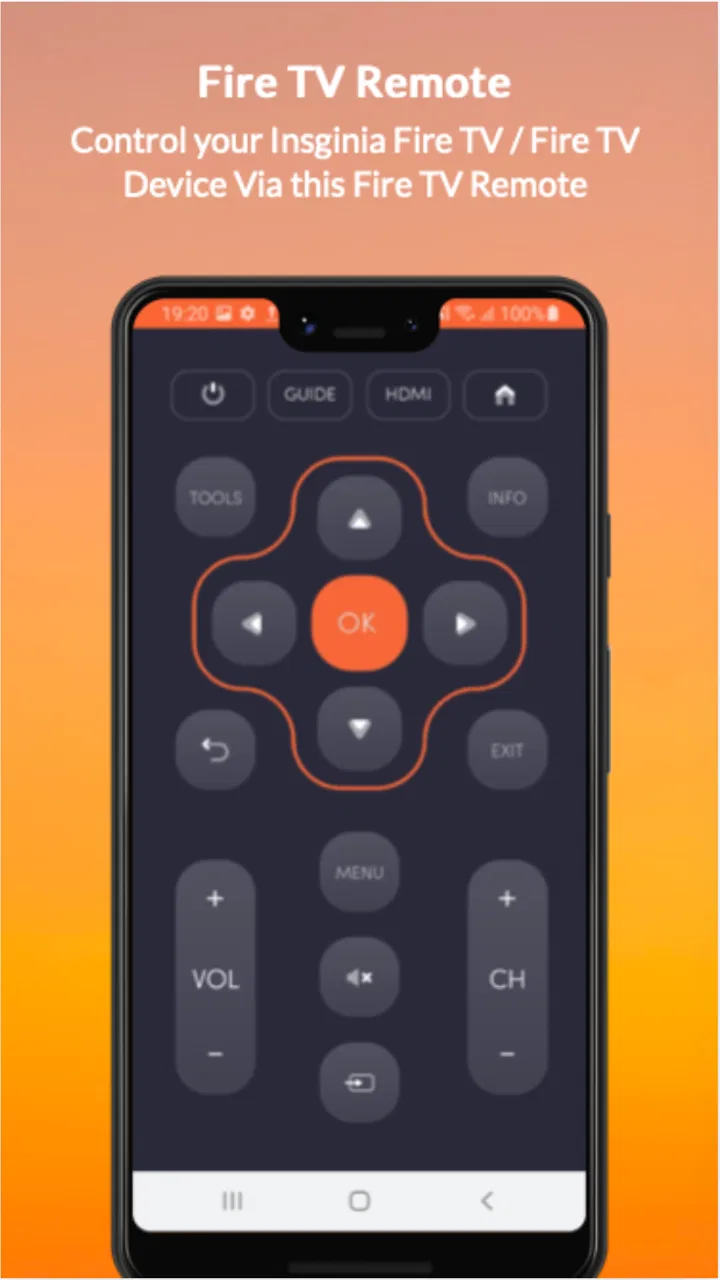
The Insignia Fire TV Remote app provides a seamless way to control your Fire TV device using your smartphone. Key features include voice search, a virtual keyboard for easy text input, quick access to apps and channels, and playback controls. This app is designed for convenience, offering a user-friendly interface that mimics a physical remote.
02Is the Insignia Fire TV Remote app compatible with all Fire TV devices?
The Insignia Fire TV Remote app is compatible with most Fire TV devices, including Fire TV Stick, Fire TV Cube, and Fire TV Edition Smart TVs. However, it's essential to check the specific compatibility details in the app store description to ensure your device is supported before downloading.
03Does the Insignia Fire TV Remote app require an internet connection?
Yes, the app requires both your smartphone and Fire TV device to be connected to the same Wi-Fi network. This connection is crucial for the app to communicate with the Fire TV device, enabling you to use the remote features effectively. Ensure a stable Wi-Fi connection for the best experience.
04How do I troubleshoot connectivity issues with the Insignia Fire TV Remote app?
If you experience connectivity issues, ensure both devices are on the same Wi-Fi network. Restart your router, Fire TV device, and smartphone. Check for updates to the app and your device's firmware. If problems persist, consult the app’s support page or your device's troubleshooting guide for further assistance.
05Is there a cost associated with using the Insignia Fire TV Remote app?
The Insignia Fire TV Remote app is typically free to download and use. However, it’s always a good idea to check for any in-app purchases or premium features within the app store listing. This ensures transparency and helps you understand if there are any additional costs involved.
Pros
- User-friendly interface for easy navigation.
- Seamless integration with Fire TV devices.
- Customizable button layouts for convenience.
- Quick access to popular streaming apps.
- Voice control for hands-free operation.
Cons
- Limited compatibility with older devices.
- Occasional connectivity issues reported.
- No option for custom voice commands.
- Requires stable Wi-Fi for optimal use.
- Battery consumption can be high.

Insignia Fire TV Remote
Gallery